
ITSM Workflow Automation — no developers required أتمتة مسارات العمل في ITSM — دون مطوّرين
Draw your process instead of coding it. Drag submission, approval, task, automation, notification, condition and timer steps onto a visual canvas — and watch requests route, assign and escalate themselves. ارسم عمليتك بدل أن تبرمجها. اسحب خطوات التقديم والموافقة والمهام والأتمتة والإشعارات والشروط والمؤقّتات إلى لوحة مرئية — وشاهد الطلبات تتوجّه وتُسنَد وتتصعّد من تلقاء نفسها.
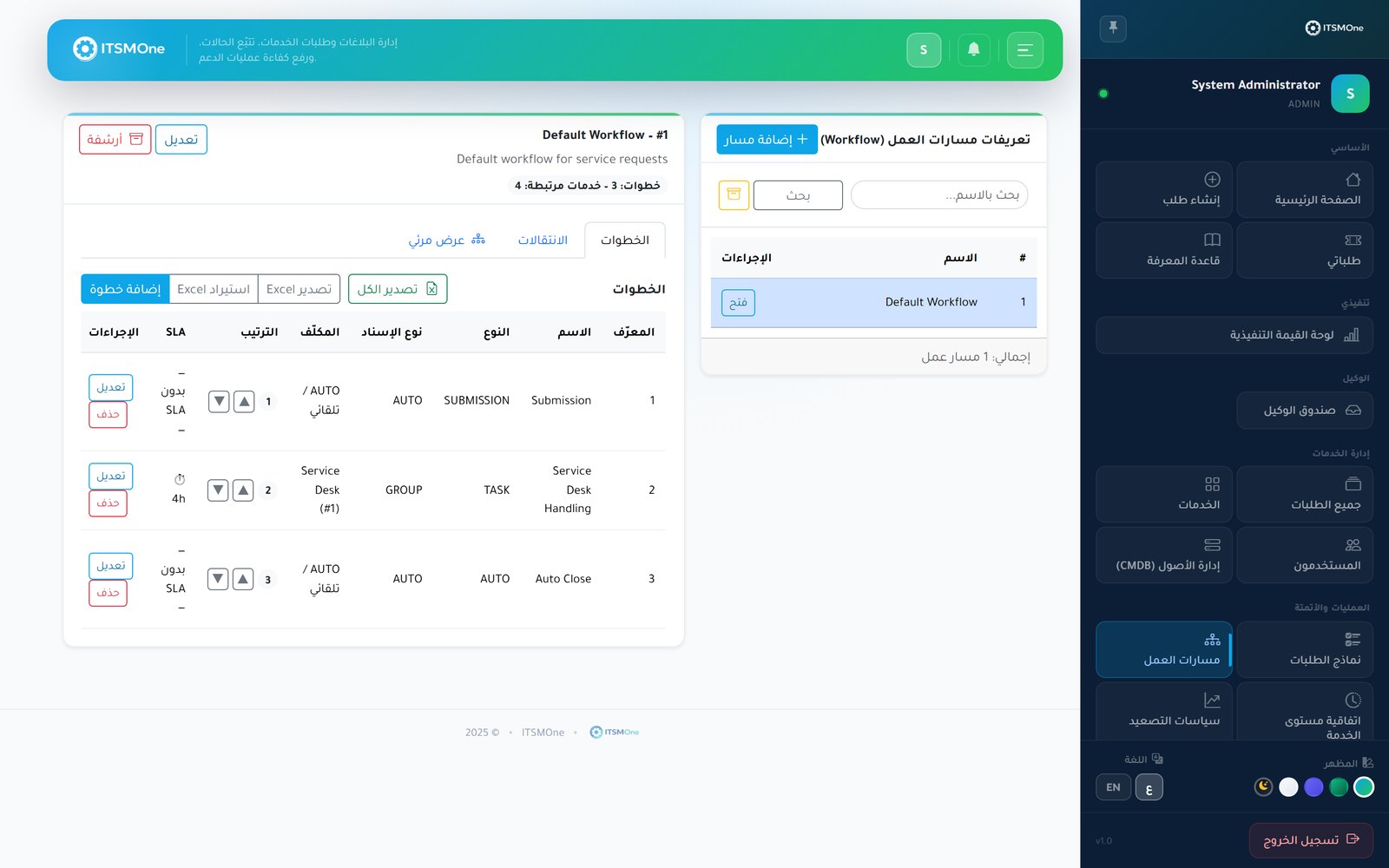
The process you drew is the process that runs — every time. العملية التي رسمتها هي التي تعمل — في كل مرة.
Anyone can build itأي شخص يستطيع بناءها
Process owners design and change workflows themselves on a drag-and-drop canvas — no tickets to the dev team, no release cycles.يصمم أصحاب العمليات مساراتهم ويعدّلونها بأنفسهم على لوحة سحب وإفلات — دون طلبات لفريق التطوير ولا دورات إصدار.
Requests find their own wayالطلبات تعرف طريقها
Condition steps read form answers and route each request down the right branch — approvals for the expensive, fast lanes for the routine.تقرأ خطوات الشروط إجابات النموذج وتوجّه كل طلب إلى الفرع الصحيح — موافقات للمكلف، ومسارات سريعة للروتيني.
Work lands on the right deskالعمل يحطّ على المكتب الصحيح
Auto-assignment sends each step to a specific user, a group, the requester's manager or a role — no dispatcher in the middle.يرسل الإسناد التلقائي كل خطوة إلى مستخدم محدد أو مجموعة أو مدير مقدّم الطلب أو دور — دون وسيط يوزّع يدوياً.
No step stalls silentlyلا خطوة تتعطل بصمت
Per-step SLAs and timer steps keep each stage on its own clock, nudging or escalating the moment progress stops.تُبقي SLA الخطوات والمؤقّتات كل مرحلة على ساعتها الخاصة، فتنبّه أو تصعّد لحظة توقف التقدم.
Seven building blocks. Unlimited processes. سبع لبنات بناء. عمليات بلا حدود.
Drag-and-drop canvas
لوحة سحب وإفلات
Compose workflows from submission, approval, task, automation, notification, condition and timer steps — the diagram is the deployment.
ركّب المسارات من خطوات التقديم والموافقة والمهام والأتمتة والإشعارات والشروط والمؤقّتات — فالمخطط نفسه هو التشغيل.
Multi-step & conditional approvals
موافقات متسلسلة وشرطية
Chain approvers in sequence, or make an approval appear only when conditions demand it — say, orders above a spending threshold.
سلسل الموافقين بالترتيب، أو اجعل الموافقة تظهر فقط حين تستدعيها الشروط — كالطلبات التي تتجاوز سقف إنفاق معيّن.
Conditional branching
تفرّع شرطي
Branch on any form field, priority or requester attribute, so one workflow gracefully handles many scenarios.
تفرّع بناءً على أي حقل في النموذج أو الأولوية أو صفة مقدّم الطلب، فيتعامل مسار واحد بسلاسة مع سيناريوهات عديدة.
Flexible auto-assignment
إسناد تلقائي مرن
Target each step at a named user, a group's queue, the requester's manager or anyone holding a given role.
وجّه كل خطوة إلى مستخدم بعينه أو طابور مجموعة أو مدير مقدّم الطلب أو أي حامل لدور محدد.
Per-step SLAs & timers
SLA ومؤقّتات لكل خطوة
Give every stage its own deadline on your business calendar, and use timer steps to pause, remind or trigger follow-up actions.
امنح كل مرحلة موعدها الخاص على تقويم عملك، واستخدم خطوات المؤقّت للإيقاف المؤقت أو التذكير أو إطلاق إجراءات لاحقة.
Automation & notification steps
خطوات أتمتة وإشعار
Update fields, change status or fire in-app and email notifications automatically — and reach Slack, Teams or webhooks through integrations.
حدّث الحقول أو غيّر الحالة أو أطلق إشعارات داخل التطبيق وبالبريد تلقائياً — وصِل إلى Slack وTeams والـ webhooks عبر التكاملات.
From a whiteboard sketch to a running process, in four steps. من رسم على السبورة إلى عملية تعمل، في أربع خطوات.
Mapرسم الخريطة
Lay out your process on the canvas: who submits, who approves, what happens next and under which conditions.ابسط عمليتك على اللوحة: من يقدّم، ومن يوافق، وما الذي يلي، وتحت أي شروط.
Configureالضبط
Set assignment targets, per-step SLAs, notifications and branch conditions for each block — all with clicks, not code.اضبط جهات الإسناد وSLA الخطوات والإشعارات وشروط التفرّع لكل لبنة — بالنقر لا بالبرمجة.
Attachالإلحاق
Bind the workflow to a catalog service or request type, pairing it with the right intake form.اربط المسار بخدمة في الكتالوج أو نوع طلب، واقرنه بنموذج الاستقبال المناسب.
Run & improveالتشغيل والتحسين
Requests flow through automatically while dashboards and the audit trail show where to tighten the design.تجري الطلبات في المسار تلقائياً، بينما تكشف اللوحات وسجل التدقيق مواضع شدّ التصميم.
Workflow automation, answered. أسئلة شائعة عن أتمتة مسارات العمل.
Explore more solutions استكشف حلولاً أخرى
If you can draw it, you can automate it. إن استطعت رسمها، استطعت أتمتتها.
Open the visual designer, drop in your first steps, and put your busiest process on autopilot this week. افتح المصمم المرئي، وأسقط خطواتك الأولى، وضع أكثر عملياتك ازدحاماً على الطيار الآلي هذا الأسبوع.